///Updated due to algorithm change in store: Nov. 26, 2017///
I was going to make more blog posts about seo and monetization. But the whole premise of this blog is to talk about writing and books.
So!
Now what's better than some average ebook?
Free Kindle Ebooks On Amazon
I know what you're thinking. Go to the Amazon store and type in FREE in the search bar, right?
WRONG.
Because all that's going to do, is bring up all the free books under the
Kindle Unlimited deal. Amazon is a for-profit business, so of course they're going to push forward KU books. Which are
only available to
Amazon Prime members. For members only, who paid for that subscription service.
And if you're not a member, you'll be charged whatever the price is on that ebook.
I'll show you how to to it easily, but you have to go step by step.
Before you go through these steps, please note:
- If you don't have an actual Kindle device, you can download the Amazon Kindle software for PC computer: https://amzn.to/2q569On
Done? Then let's get some FREE Amazon Kindle ebooks!
1. Sign in to your Amazon account
First and foremost, sign in. Because once you do, all books will be sent to your Amazon account. Without an Amazon account, you will get squat. Nothing. Nada.
On the Amazon.com search bar, make sure you click that left side grey button to select
Books, and narrow down your selection only to Kindle Store. Set it that way so it doesn't go looking at all corners of the giant Amazon store, pulling up search results you don't want.
For example: You want Harry Potter and the Sorcerer's Stone, not the Harry Potter DVD of the book by the same name.
2. In the Amazon search bar, Select Books on the left drop-down menu, then type the following exactly: 0.00
Very important that you type it that way. '0.00' (minus apostrophes) Because that means zero dollars and zero cents.
When you go through this step,
go very slowly. You want to double check that the price next to the book actually reads
Kindle Price: $0.00
and does NOT read
Kindle Unlimited $0.00 or
$0.99 or some other arbitrary price number. (see below) otherwise, you're on the hook for whatever price they sell it at.
This works on Amazon United States. For other countries, set the local currency to all zeros. So for Amazon U.K. it should read as £0.00 and such.
3. Get the book in an Amazon store that is not in the United States
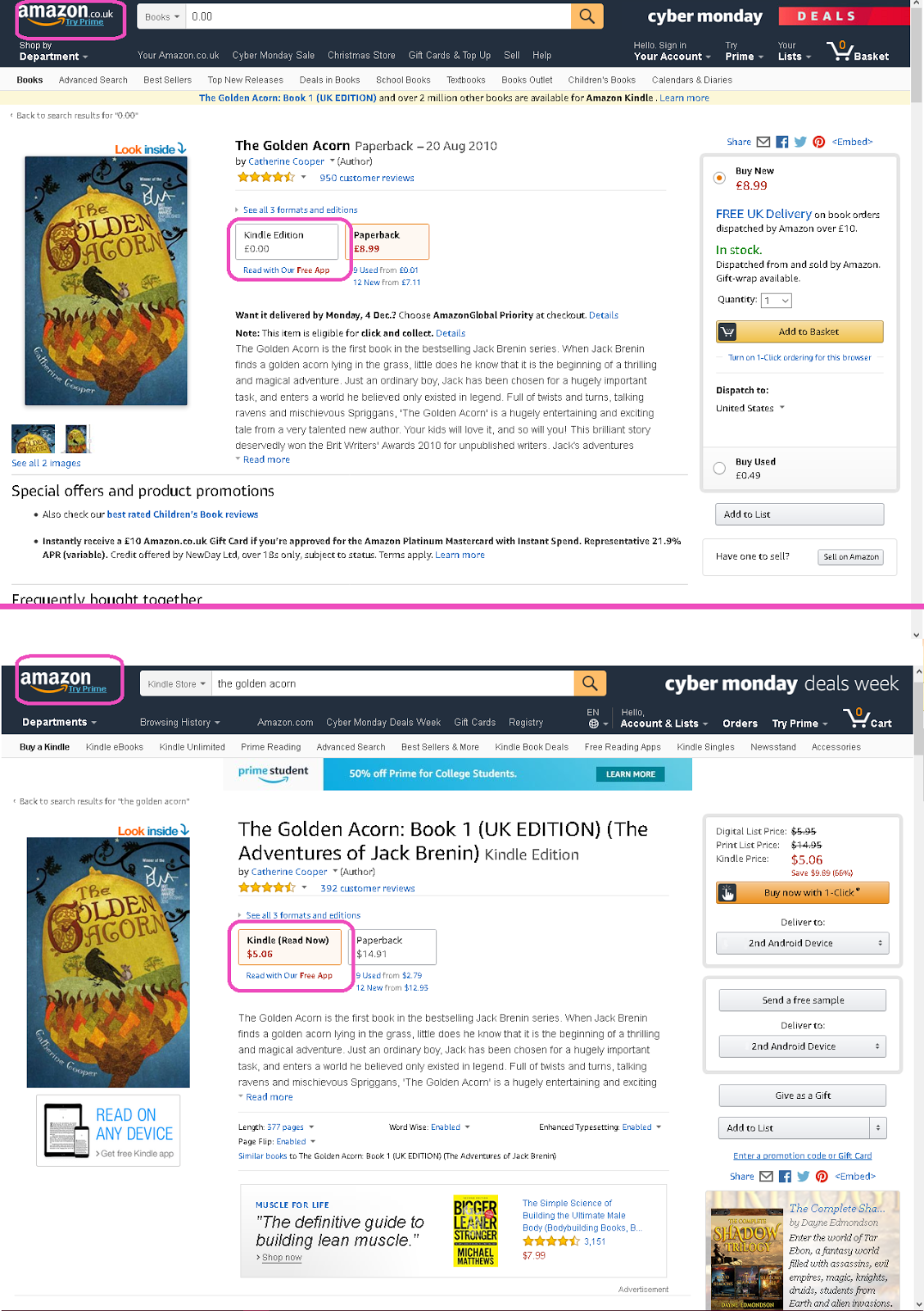
BE AWARE: The same FREE ebook in the American Amazon store (www.Amazon.com) will not be FREE in the British Amazon store (www.Amazon.co.uk)
Book release dates are set by foreign publications rights, which are limited. So one book can be released early in one country, while taking months to be launched in another.
Here is an example:
Both stores are considered separate entities, therefore your
American login information will not work in the British store, and vice
versa.
Same goes for the Canadian Amazon store, the Japanese Amazon store, etc.
How To Switch Countries On Amazon
Scroll down to the very bottom of the Amazon store to switch to your country of choice:
4. Get the book
Before you get that book, go to the right side of the screen inside that green box. It has a drop-down menu with options. Those options are the places Kindle will send your book to. You can send it to your Kindle PC software, to Kindle Cloud for storage, or in my case, to my Kindle Android device which I set it to. Do this now.
Now you can get your free ebook!
To acquire the book, click on the
orange button on the right hand side that says
Buy now with 1-Click™ *. Don't be afraid, it's not actually going to charge you money for it. It just means that this particular shopping cart transaction is now completed, letting you know you finally have your book sent to your Kindle eReader, or Kindle software you installed on your tablet.
If it worked properly, this is the next page you should see:
The book should be included in your Kindle library now.
5. Check your summary statement
Since the
View a summary of your order button is there, let's take a look at it.
Clicking on it will ask you for your password, then this screen shows up:
Oh look, everything is
zeros. That's exactly what we want.
And if you take a look on the right hand side, there's a button that allows you to
Need to print an invoice? so you can indeed print a hard copy for your own records. I'm not sure how long Amazon holds onto this information but I do keep my own copy for myself, in the rare event of a computer glitch.
Always keep proof of transactions!
Why does Amazon give away free ebooks? Is it a scam?
It's completely legit. Sometimes a publisher chooses to give away a free ebook outside of the
Kindle Unlimited deal because they haven't signed up for KU. KU is for members only; one must as a reader or an author, sign up for it to get/give specials and discounted books for participants only. But not everybody signs up for KU, it's voluntary.
Sidenote: KU has received mixed reviews by some authors. Some say it's advantageous while others comment mixed reviews. It's always best to review the fine print and evaluate before signing up.
Why do authors give away free ebooks on Amazon?
Some authors who aren't signed up for KU simply give away a free ebook anyway for one purpose: To hook in a reader.
That first book in a long series will keep them coming back for more. So! 1st book is free, and the rest of the series costs money to purchase. Wider demographic exposure. Plain logic. Everybody wins!
One more thing...
Just because a book is free for 2 months doesn't mean it will be in 3 months. These freebie offers are often fleeting, so if there's a book you really want, and you said to yourself
Still looking, I'll come back later then chances are, it may not be there when you return. Take is as you go, because availability is not always guaranteed.
And that's pretty much all there is to it. Happy book downloading!
* (this is Amazon's trademark; all their rights reserved.)

 CONTINUE READING